• Products
    Products

    lightbulb icon
    Our products

    We're known for our fast, reliable, and user-friendly analog modems that help connect a generation.

    Global product availability
    Dealers
    cellular gateway icon
    Cellular M2M modems and gateways
    USR3513 4G Cellular Gateway
    USR3500 3G Cellular Modem
    USR3510 3G Cellular Gateway
    network tap icon
    Network TAPs
    USR4523 Ethernet Aggregation
    USR4524 Ethernet Aggregation
    4524-MINI Portable Ethernet Aggregation
    USR4525 Multi-mode LC Fiber
    USR4526 Single-mode LC Fiber
    Network TAP accessories
    56k modem icon
    56K dial-up modems
    USR3453C-REF Courier Business Modem
    USR5686G Serial Faxmodem
    USR5630G Serial Faxmodem
    USR5638 PCIe Modem
    USR5639 USB Softmodem
    USR5670 PCI Faxmodem
    USR805671 PCI Faxmodem
    USR802981-OEM OEM PCI Modem
    USR263093-OEM OEM PCI Faxmodem
    USR5686G-PRO Courier Lite Modem
    USR5637 USB Voice Faxmodem
    56K modem accessories
    56K modem comparison

    Products A-Z
    Global product availability
    Dealers
  • Education
    Education

    learning tools icon
    Explore our learning tools

    Use our education essentials to learn about Courier® business products, the Courier® modem brand, how modems work, and how to choose the one that's right for you.

    learning icon
    Start learning
    Education
    information icon
    Courier® business products
    Why buy Courier?
    Out-of-Band connections
    Modem Point of Sale
    Modem technology
    Courier Lite Global Kits
    Courier (3453C) Global Kits
    Courier support
    information icon
    All about dial-up
    History of USR modems
    Modems 101: The basics
    Modem speeds
    V.92 in detail
    What are the different types of modems?
    What kinds of modems are available?
    Getting online with dial-up modems
    Modem applications
  • Support
    Support

    internet icon
    Stay connected

    Updates, drivers, manuals, and other resources to optimize your product's performance and enhance its functionality.

    technical support icon
    Support
    Product registration
    Sales support
    Technical support request
    technical services icon
    Technical information
    Windows compatibility
  • Dealers
  • Company
    Company

    our company icon
    Our company

    USR is a leading provider of global connectivity hardware, trusted by millions of businesses and consumers for over 4 decades.

    overview services icon
    Overview
    About
    Contact
    Partners
    press icon
    Press
    Newsroom
    resources icon
    Resources
    Videos
    Product datasheets
    Case studies
    White papers
    Backgrounder
    Fact sheet
  • Search
  • Contact us
Dial-up modems

Dial-up modems

What are the different types of modems?

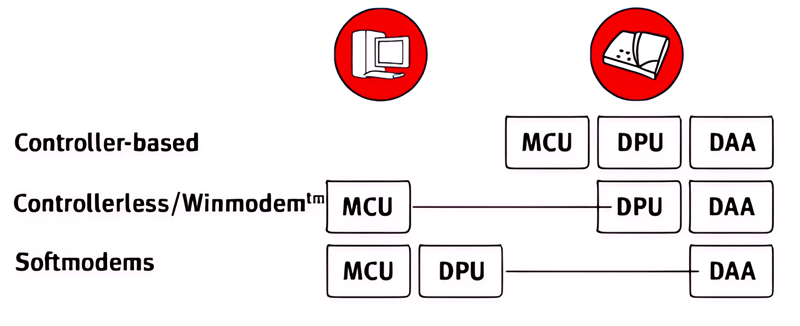
Modems are distinguished from one another by their architecture, that is, where the processing takes place: in the modem or in the PC.

Controller-based modems

A hardware modem is a "Controller-based" modem, and it does all of the work. This type of modem provides the best power and performance, and it does not utilize the PC's processing power. All three components (MCU, DPU, and DAA) are in the modem itself. It can work with many operating systems, and functionality may be upgradeable through ROM uploads.

Controllerless or Winmodems™

Controllerless modems (or Winmodems™), as the name implies, do not have an onboard Microcontroller. As a result, data compression and the generation of AT commands are performed by the PC. Since most PCs sold today run the Windows operating system, the microcontroller program is usually written specifically for Windows, hence the name "Winmodem." They are useful in laptops, as they tend to use less power. Winmodems are usually software upgradeable.

Softmodems

Softmodems are, quite simply, Software Modems. All processing is done by the PC, and the "modem" is little more than an interface to plug in the phone jack. These modems require the PC to do all of the work, and they will only run in the Windows Operating System. Many PC makers put Softmodems in the PCs that they sell to consumers, as they are extremely inexpensive. They are upgradeable.
what are the different types of modems?

History of USR modems

Modems 101: The basics

Modem speeds

V.92 in detail

What are the different types of modems?

What kinds of modems are available?

Getting online with dial-up modems

Modem applications

UNICOM divisions

Enterprise software

IT infrastructure

Government technology

Finance & real estate


Useful links

About

Contact

Dealers

Newsroom

Partners

Products

Regulatory compliance

Sitemap


Privacy & legal

Cookies

Legal

Privacy

Do not sell my personal information


Social media

© 2026 USR    |    All rights reserved.